


VN: Photo & Video Editor
4.717.04K Reviews
App Specs
- Version
- 2.17.0
- Updated On
- License
- Free
- Downloads
- 100,000,000+
- Developer
- Ubiquiti Labs, LLC
- Categories
- Video Players & Editors
- Platform
- Android, iOS
Screenshots
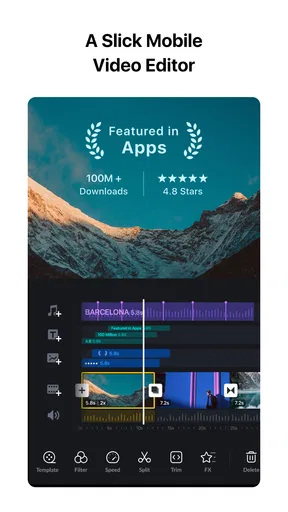
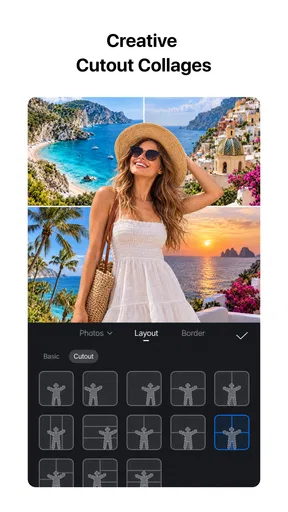
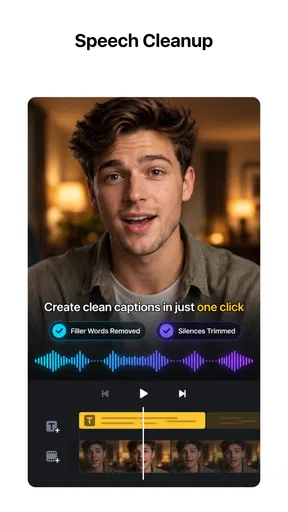

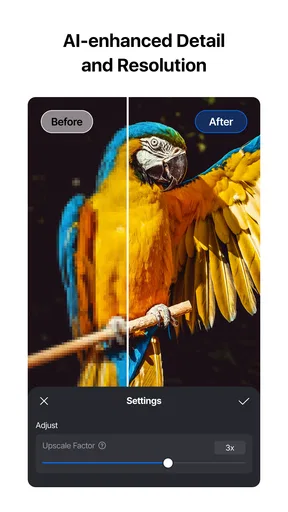
 Analysis by AppCompare
I judge a mobile editor by what happens between filming a clip and actually sharing it: how much work I can do on the phone, whether the layout slows me down, and what happens when the connection is unreliable. VN – AI Video Editor is a free video-editing app from Ubiquiti Labs, LLC, and its appeal is that it puts a fairly capable timeline workflow on a phone without demanding a desktop-style learning curve. It has a 4.7 average from around 5.1 million ratings and over 100 million installs, so it is clearly familiar to many mobile creators. That popularity is reassuring, but I’d still choose it based on the kind of projects I actually make.
Editing on a phone, from first cut to finished video
So, I’ve been tinkering with this app called VN – AI Video Editor for a while now, and I have to say, it's quite the powerhouse for anyone into video editing. Whether you're a newbie or a seasoned pro, this app packs a punch with its features. Let me break it down for you.
Getting Started with VN - AI Video Editor
Diving into VN - AI Video Editor is as smooth as it gets. The installation is quick, and the user interface is delightfully intuitive. I was up and running in no time, which is always a plus. You don’t need to be a tech wizard to navigate it, and that's a huge relief.
The app opens up with a slick, modern design. You’re greeted with a dashboard that’s easy on the eyes. All the main tools are neatly arranged, so you’re not left hunting around for what you need. This is a big win, especially if you’re working under tight deadlines or just want to get things done without a fuss.
VN is currently at version 2.11.0 and is rated Teen, details worth keeping in mind if you’re choosing an editor for a younger creator or a shared device. The app is free to download, with optional in-app purchases ranging from $0.99 to $69.99 per item. I’d treat those purchases as optional rather than part of the basic decision: first see whether the editing workflow fits your needs before spending on anything extra.
Feature-Packed Editing Tools
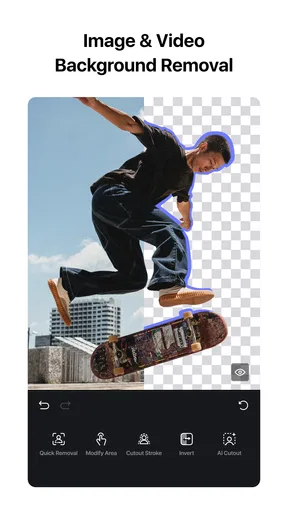
Now, let’s talk features. This app doesn’t hold back. It offers a robust set of editing tools that cater to all your needs. You’ve got your basic trimming and cutting, but it’s the advanced features that really stand out. The AI-powered editing tools are a game-changer.
One of the standout features is the auto-captioning tool. It’s impressively accurate and a massive time-saver. For anyone creating content for social media, this is a godsend. You can also add transitions, filters, and effects with just a tap. The app makes it feel like you’re working with professional-grade software.
Worth Reading Before You Choose

Flipboard Shows What News Apps Must Do Beyond the Feed

Switching to Android Auto Means Rethinking Your Driving Routine

Google Calendar Makes a Crowded Week Easier to Manage

Ludo King Makes the Most of the Minutes Between Plans

Baby Panda World Brings Quick Play to Modern Phones, but Its Game Library Feels Busy

ESPN’s Live Game View Makes Following Close Games Easier
For a more reliable caption result, I’d still review the text before exporting, especially when a clip includes names, background noise, or quick speech. Automatic captions can save the first pass of typing, but they shouldn’t be treated as a final proofread. A practical workflow is to trim the clip first, generate captions for the section you intend to keep, then check timing and wording while the spoken line is fresh in your mind. That avoids spending time correcting captions for footage you later remove.
The timeline is most useful when I plan the edit in small decisions rather than trying to decorate everything at once. I’d assemble the clips in order, tighten the openings and endings, then add transitions and effects only where they help the viewer follow a change in scene. On a phone, restraint matters: a crowded edit is harder to inspect on a small screen, and effects that look lively while editing can compete with the subject when watched on a larger display.
Audio and Music Integration
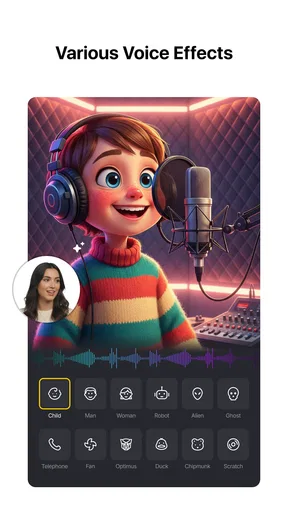
Audio is a big part of any video, and VN nails this aspect too. You can easily add music tracks from their library or import your own. The app gives you the flexibility to adjust audio levels, which is perfect for getting that just-right balance between dialogue and background music.
I particularly loved the sound effects library. It’s vast and diverse, letting you add that extra flair to your videos. Whether you’re looking for a dramatic punch or a subtle ambient sound, it’s all there.
For a real-world example, imagine cutting together a short clip from a family outing while waiting for a train. I’d first choose the few moments that tell the story, then lower the music enough that a spoken comment or the natural sound of the scene remains easy to hear. If the location is noisy, I’d avoid adding several sound effects simply because they are available; one carefully placed accent usually reads better than a layer of competing noises. The phone-friendly controls make this sort of quick pass practical, though careful audio balancing still takes attention.
Network moments and mobile workflow
Connectivity shapes parts of the experience even when the editing itself is happening on a handset. Downloading the app, accessing online resources, and sharing a finished video are moments when a steady connection can make the process feel quicker. I wouldn’t plan an urgent upload around an uncertain signal: finish the edit first, then share when the connection is dependable. That way, a delay during posting doesn’t turn into pressure to rush the timeline.
VN is a natural fit for short social clips, travel recaps, school projects, and personal videos where the source footage is already on the phone. It is less appealing if your routine depends on moving large batches of files between several devices, coordinating edits with a team, or doing precise work that benefits from a wide monitor and keyboard. In those cases, a desktop editor or a collaboration-focused tool may be a better match, even if it takes longer to learn.
On mobile, I’d also think about the conditions around the edit. A bright outdoor screen, limited time, and interruptions can make fine adjustments awkward. I find it more sensible to do rough trimming and ordering in a spare moment, then save detailed caption checks, audio balancing, and final export for when I can concentrate. This split keeps a quick phone session useful without pretending that every stage is equally comfortable on a small display.
Exporting and Sharing
Once your masterpiece is ready, exporting is a breeze. VN supports various formats and resolutions, making it ideal for different platforms. Whether you’re posting on Instagram, YouTube, or just sharing with family and friends, the app’s got you covered.
Sharing directly from the app is also seamless. You can post to your social media channels or save it to your device. I found this feature particularly handy when I needed to upload my content on the go.
Before exporting, I’d watch the whole edit once rather than checking only the opening. That final pass catches abrupt cuts, captions that arrive late, and music that suddenly feels too loud. I’d also pick a resolution that makes sense for where the video will be watched instead of automatically choosing the largest option. Higher-quality output can mean a larger file and a longer wait to share, which is an unnecessary trade-off for a casual clip viewed mainly on a phone.
If an upload stalls or the connection drops, the safer response is to keep the finished video saved on the device and try sharing again when the network is stable. I wouldn’t assume a failed post means the edit itself is lost, but I would make sure the export has completed before closing out of the workflow. For projects that matter, keeping the final file separate from the act of posting gives you another chance to share it without rebuilding the edit.
User Experience and Performance
Performance-wise, VN is rock solid. I didn’t encounter any lags or crashes, which is crucial when you’re in the middle of an editing session. Everything runs smoothly, and the app handles heavy files with ease. It’s clear the developers have put a lot of effort into optimizing the app.
The community support and tutorials are also worth mentioning. If you ever get stuck, there’s a wealth of resources available to help you out. Plus, the app frequently updates with new features and improvements, keeping it fresh and relevant.
My experience with performance is a reason to try it, not a guarantee that every phone or project will behave identically. Long edits, large source files, and a device already busy with other tasks can make mobile editing less comfortable. If a project is important, I’d work in manageable sections and check the result as I go instead of leaving every decision until the final export. That habit also makes it easier to spot a problem while the relevant clip is still easy to find.
Being mindful of data is useful if you edit or share away from Wi-Fi. I’d avoid repeatedly exporting and uploading a draft just to inspect small changes; preview the timeline, make a batch of adjustments, and export when the cut is close to final. If you’re using online resources or sharing through a mobile connection, wait for a suitable network when the file is large. This is less about restricting creativity and more about avoiding unnecessary transfers and waiting.
Where it fits among mobile editors
Compared with a very simple editor that focuses on quick templates and one-tap posting, VN gives me more room to arrange clips and shape the result. That flexibility is useful when I want the finished video to feel personal rather than assembled from a preset. The trade-off is that a timeline asks for more decisions: clip order, pacing, sound levels, and captions all need a little attention. Someone who wants a polished post in the fewest possible taps may prefer a template-first alternative.
Against professional desktop software, the advantage is convenience, not a claim that a phone replaces a full editing workstation. I can make a strong short-form cut without moving to a computer, but lengthy projects and highly detailed finishing are easier to manage on a larger screen. For someone learning how cuts, music, and text work together, VN offers a useful middle ground between a basic social-media editor and heavyweight desktop tools.
It is especially suited to creators who want direct control over short videos and are willing to check their work before sharing. I’d recommend it to a student making a class recap, a small business owner preparing a simple product clip, or a traveler turning phone footage into a personal montage. I’d steer away from it if the main need is collaborative review, complex long-form production, or a workflow built around constant transfers among devices; those needs call for tools designed around a larger editing setup.
Final Thoughts
All in all, VN – AI Video Editor is a stellar choice for anyone looking to dive into video editing or enhance their current toolkit. It’s user-friendly, packed with features, and performs like a champ. Whether you’re editing for fun or creating professional content, this app is up to the task.
So, if you’re on the hunt for a reliable and efficient video editing app, give VN a try. You won’t be disappointed. Happy editing!
My practical verdict is that VN is at its best when I can do the creative work on my phone and treat network access as something needed for particular steps, especially online access and sharing, rather than a reason to rush the edit. I’d start with a small project, test the caption and audio workflow, and see whether its timeline feels comfortable on my device. If it does, it can handle plenty of everyday video making; if my projects grow into long, collaborative productions, I’d move to a desktop-focused editor instead.
Pros
- Easy-to-use interface for beginners.
- Wide range of AI editing tools.
- Supports 4K video exports.
- Regular updates with new features.
- No watermark on exported videos.
Cons
- Occasional lags in performance.
- Limited music library options.
- Some features require paid version.
- Ads can be intrusive at times.
- Occasional crashing on older devices.
FAQs for VN: Photo & Video Editor
What platforms is VN - AI Video Editor available on?
VN - AI Video Editor is available for both Android and iOS devices. Users can download it from the Google Play Store for Android or the Apple App Store for iOS, ensuring compatibility with a wide range of smartphones and tablets. It's also available for macOS and Windows, offering versatility across different devices.
Does VN - AI Video Editor support 4K video editing?
Yes, VN - AI Video Editor supports 4K video editing, allowing users to work with high-resolution videos. This feature ensures that creators can maintain the quality of their footage, making it an excellent choice for professional videographers and content creators looking to produce high-quality videos.
Are there any costs associated with using VN - AI Video Editor?
VN - AI Video Editor is free to download and use, offering a robust suite of features without any upfront cost. However, there may be optional in-app purchases or subscriptions available for users who want to unlock additional features or remove ads, enhancing their editing experience.
What kind of AI features does VN - AI Video Editor offer?
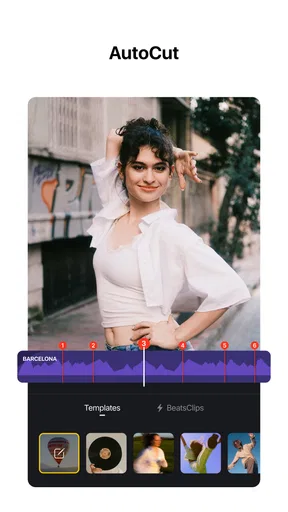
VN - AI Video Editor incorporates several AI-powered features to enhance video editing. These include automatic scene detection, intelligent color correction, and AI-driven transitions, which help streamline the editing process and improve the overall quality of the video output for both novice and experienced editors.
Is VN - AI Video Editor suitable for beginners?
VN - AI Video Editor is designed to be user-friendly, making it suitable for beginners. It features an intuitive interface and offers guided tutorials to help new users understand its functions. Additionally, the app includes pre-set templates and easy-to-use tools that simplify the editing process, allowing beginners to create professional-quality videos with ease.


